

Imagine an AI coding tool asks you for permission to access a file. You look at the approval prompt and notice the file path appears to land in the current workspace. You shrug, wondering why the agent asked for access to the current workspace, and you click to approve. But without realizing it, you just approved access outside the workspace, potentially leading to data loss or system compromise.
Sounds far-fetched? We discovered this exact vulnerability in Anthropic’s Claude Code plugin for Microsoft VSCode. We reported it to Anthropic but they declined to consider it a security issue. Read on for details.
Background
Back in May 2026, security company Adversa AI published details of a Claude Code CLI vulnerability. https://adversa.ai/blog/the-approval-prompt-is-lying-to-you-symlink-rce-in-five-ai-coding-agents-claude-code-cursor-antigravity-copilot-grok-build/
Adversa found that Claude Code CLI would prompt the user for approval if Claude Code’s AI agent attempted to access a file through a symlink that pointed to a file or folder outside the workspace. The approval prompt, however, showed the symlink path relative to the workspace. A symlink at ./link pointing to /etc/ would be reflected in the prompt as ./link; for example requesting access to ./link/passwd would generate a permission prompt showing ./link/passwd, not the actual file of /etc/passwd.
The user was not accurately shown the file’s true destination despite the permission prompt catching the access attempt.
Anthropic reportedly declined to consider Adversa’s report a security issue . But according to Adversa Anthropic silently fixed the vulnerability a few weeks after receiving the report.
The vulnerability I found builds on Adversa’s research.
Vulnerability
Anthropic publishes a Claude plugin for Microsoft’s Visual Studio Code (VSCode) Integrated Developer Environment (IDE): https://marketplace.visualstudio.com/items?itemName=anthropic.claude-code Developers can install the plugin to use Claude Code directly within VSCode. The plugin has over 29 million installs as of publication time.
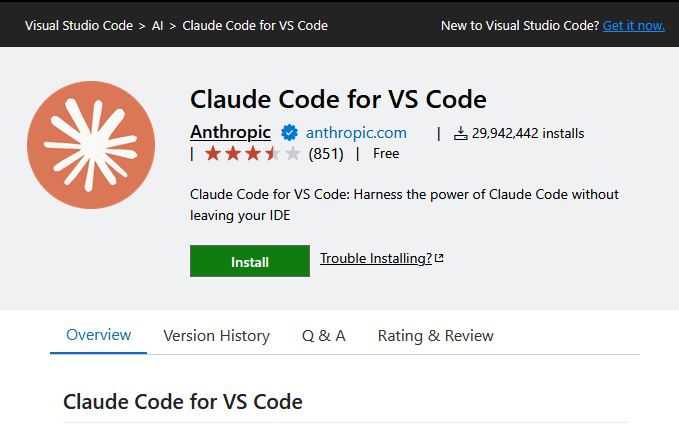
I recently set out to review several VSCode plugins for vulnerabilities and the Claude Code plugin was one of them. I’d seen the Adversa research but I anticipated Anthropic would have updated the Claude Code VSCode plugin along with Claude Code CLI.
At one point during testing I randomly decided to check and see if the plugin had indeed been updated. Surprisingly the VSCode plugin failed to display the symlink target in the permission dialog prompt when I tested it.
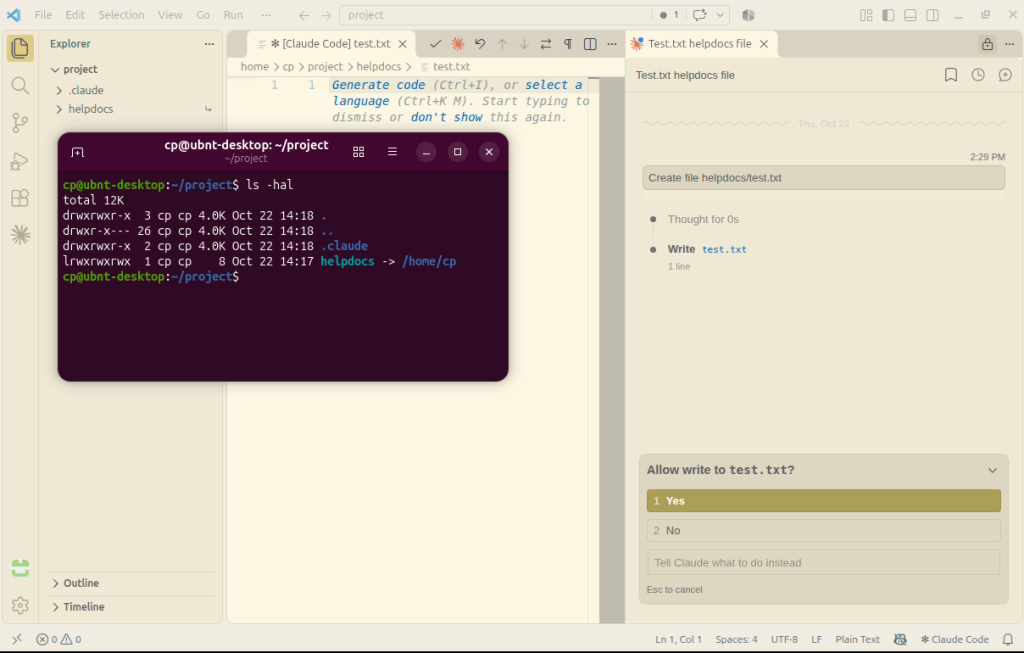
The above screenshot shows Claude Code prompting the user for permission to write to test.txt after being prompted to create helpdocs/txt.
Looking at the terminal overlay we see that ./helpdocs is a symlink pointing outside the workspace. The Claude Code plugin prompts for user approval but doesn’t display the real file path. There is no visible indicator that the test.txt file lands outside the workspace.
Anthropic had apparently patched the Claude Code CLI after the Adversa report, but had not patched the Claude Code VSCode plugin.
When asking a user to approve a security-sensitive operation, it is critical for software to display relevant context so the user can make an appropriate decision. By not displaying the symlink target, the user is mislead about what file or folder the agent is actually trying to access.
Impact
A Claude Code agent making rogue decisions, or acting under the influence of a prompt injection attack, can exploit this vulnerability to induce users into approving access to files outside the current workspace.
The specific impact depends on any symlinks in a given environment. For example, a symlink to the user’s home directory could allow reading and writing SSH keys from ~/.ssh/.
Vendor Response
I reported the vulnerability to Anthropic on 10/22/2206 via their HackerOne program. Anthropic concluded this behavior is not a vulnerability and closed the report as informative. Anthropic’s reasoning is that the permission prompt itself is sufficient and the information displayed in the prompt is not considered part of the security control.
We appreciate Anthropic reviewing our report but our assessment differs. We believe this is a UI/UX security issue that leads to workspace escape. The existence of an approval prompt by itself is insufficient. Showing relevant and accurate information within the prompt is crucial when asking users to make decisions with security implications.
The vulnerability remains unpatched in the latest plugin version 2.1.322 as of this publication.
The following screenshot shows Claude Code CLI’s current behavior for comparison purposes. Claude Code CLI correctly displays the actual file location and warns the user that the operation involves a symlink resolving outside a trusted folder. This behavior reflects Anthropic’s silent fix after the Adversa-reported issue.
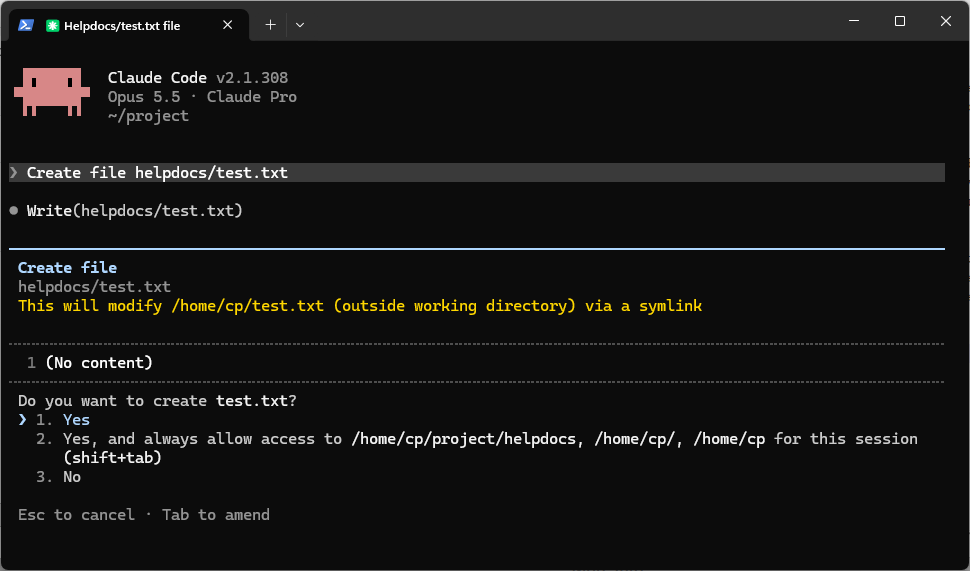
The Claude Code VSCode plugin should be updated to display similar information to the user during a permission prompt involving symlinks.
Symlink Security
Anthropic also stated in their response that symlinks are out of scope for Claude Code’s permission threat model although their public HackerOne program guide does not appear to list the exclusion.
Claude Code’s trust model assumes that opening a workspace trusts the workspace’s filesystem and thus any symlinks in the workspace are also trusted.
This trust model has some merits but, if the workspace is trusted, why does Claude Code prompt for user permission at all when traversing workspace symlinks? If Claude Code trusts the workspace filesystem, then prompting for symlink access approval seems pointless. The permission prompt implies a security boundary.
The “trusted workspace” threat model used by Claude Code and other software development tools is generally reliable but has a couple limitations that need to be accounted for.
First, a code repository in the local workspace may be trusted initially, but what happens when another software engineer’s account in the organization gets compromised? An attacker controlling a compromised account can push a malicious commit to a shared repository, which then enters the local workspace of other engineers after the next repository sync. The popular version control software Git supports symlinks, so a previously trusted workspace can receive malicious data such as symlinks as part of a repository sync.
Second, we can assume users recognize known symlink names in the permission prompt, but this is not always a reliable assumption. Depending on the permission mode the user has configured, the Claude Code VSCode plugin may be able to rename files in the workspace without user approval. A symlink at ./foo/bar could get renamed to ./foo/bat, with the agent subsequently attempting file operations in path ./foo/bat/*. The user doesn’t see the known symlink name in approval dialog, assumes the path stays within the workspace, and approves the request.
Given these scenarios, it remains vital for coding tools to display relevant context when asking users for security decisions.
Workaround
The realistic workaround at the moment is to manually check the file or folder displayed in the permission dialog.
To check, open a terminal and run the following shell command:
$ realpath <path displayed in permission dialog>The command displays the real filesystem location referenced by the path. If the real location is not in the workspace (or other allowed locations), then check the agent’s requested file path for possible symlinks.
Conclusion
AI tools accelerate software development and enable software engineers to accomplish more than ever before. As software development depends more and more on AI tooling, securing these tools becomes ever more important. Making sure your tool’s users have relevant information when making security decisions helps maintain safe development environments for your users.
Until next time!
Comments are closed