
Table of Contents
Key Takeaways
- Some WordPress plugins use .htaccess files for security.
- Apache uses .htaccess files but other web servers don’t.
- Vulnerabilities can appear if plugins rely on .htaccess files when installed on non-Apache servers.
Welcome
Welcome to the inaugural research article showcasing security insight from UltraStrike’s analyst team! My name is Carl Pearson and I’m the founder and senior security analyst at Ultrastrike. I’m excited to share some research I recently conducted in the realm of WordPress plugin security.
By sharing research into lesser known vulnerabilities and threat vectors, we hope to contribute to the overall security of the Internet ecosystem. Cheers!
Background
WordPress is a popular content management system (CMS) used by over 40% of websites on the Internet as of 2025 according to W3Techs and cited by hosting provider WordPress.com. https://wordpress.com/blog/2025/04/17/wordpress-market-share/.
WordPress is written in PHP and is intended to work with most web server software. Apache and Nginx are two popular web servers often paired with WordPress, although WordPress is not limited to either. https://make.wordpress.org/hosting/handbook/server-environment.
Site admins can extend functionality through 3rd party software called plugins. Plugins are useful but increase the attack surface of the WordPress site where they are installed, as the security of the site now also depends on the security (or lack thereof) of installed plugins.
Many organizations write custom plugins they install on their internal WordPress sites. The research presented here affects any plugin, not just plugins available on the WordPress plugin marketplace at https://wordpress.org/plugins/.
Details
In a typical web server deployment, remote visitors can access files and child folders inside the web root folder. Most server software assumes the web root is intended to be accessible unless otherwise specified.
The Apache web server allows site admins to control remote visitors’ access to files and folders through the use of .htaccess files. An .htaccess file is similar to a set of firewall rules with ‘allow’ or ‘deny’ statements for files in the folder where the .htaccess file resides. The .htaccess file’s rules are also applied recursively to subfolders and files.
A sample .htaccess file could contain this content:
Options -Indexes
<FilesMatch "\.(zip|gz)$">
  Order allow,deny
  Deny from all
</Files>
These rules disable directory indexing and block access to all .zip and .gz files.
But an .htaccess file can be even simpler, such as the following one-liner:
deny from allThe previous rule denies external access to files in the current directory and in child directories.
Ultrastrike’s research team found that WordPress plugins sometimes create .htaccess files inside plugin-related folders when the plugin is installed. These .htaccess files appear primarily used to block access, such as denying access to backups or file uploads.
On a web server running Apache, the .htaccess file strategy is sufficient. The plugin’s .htaccess files are interpreted by Apache and rules are enforced.
But what about WordPress instances using another server software? Most non-Apache web servers don’t support .htaccess files. If a WordPress plugin writes an .htaccess file on an Nginx server, Nginx ignores the file and serves the folder’s content.
This creates an interesting attack surface. If a WordPress plugin is overly reliant on .htaccess files for security, it can lead to vulnerabilities which are exploitable when the plugin is installed on a non-Apache web server. A sensitive file protected on Apache servers may be unprotected on other web servers.
Most major alternatives to Apache, including Nginx, IIS, and Caddy, do not support .htaccess files. The only non-Apache server identified during research that does support .htaccess files is a server called LiteSpeed.
For the purposes of the article, “non-Apache” refers to servers that do not support .htaccess files, even though some lesser known servers such as LiteSpeed do actually support it.
Examples
To illustrate what a vulnerability looks like we will look at two plugins where overreliance on .htaccess files resulted in vulnerabilities for WordPress sites using Nginx or other non-Apache servers. I observed other plugins disclosing internal files such as logs but these 2 examples in particular had higher impact beyond just log files.
Everest Backup
Everest Backup is a plugin offering site backup functionality. https://wordpress.org/plugins/everest-backup/.
Everest Backup stores backup files at <WordPress web root>/wp-content/ebwp-backups/ with file name format like ebwp-MM-DD-YY-###-<timestamp>-<10 character random string>.ebwp. The presence of a random string helps prevent guessing the file name and restricts download access to admins, who receive download links on the dashboard.
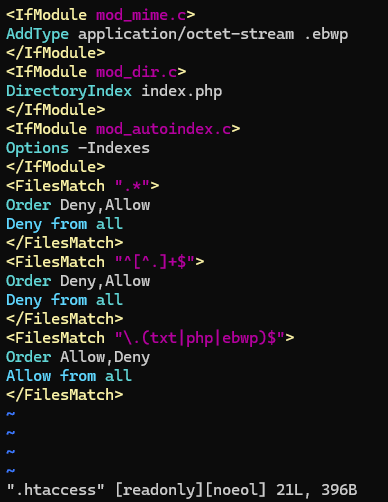
The <WordPress web root>/wp-content/ebwp-backups/ folder contains an .htaccess file. The file’s rules allow download of .ebwp backup files and .txt files, execution of .php files, and prevent access to other files.
When a backup operation is in progress, Everest frequently writes the operation’s current status to a file named .PROCSTAT in the ebwp-backups/ folder.
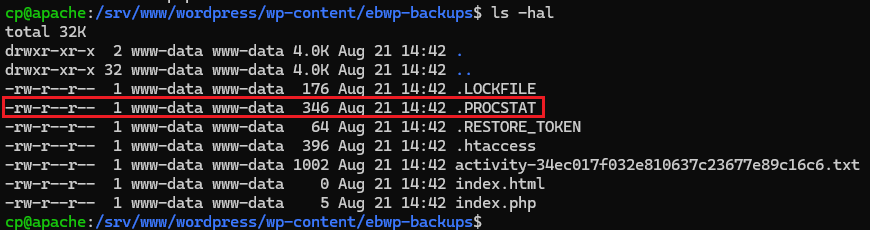
The file is continuously updated with the backup operation’s current status:

When a backup operation nears completion, the file includes the full file name of the generated backup.
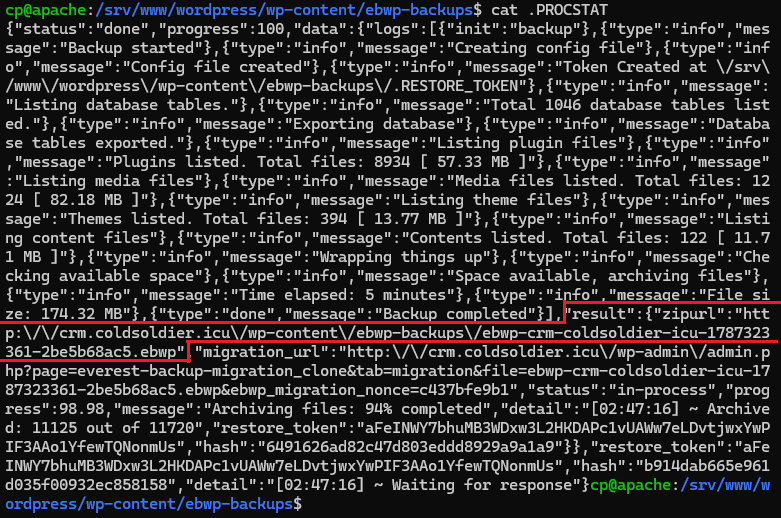
Backup files can be downloaded without authentication. The intended protection mechanism is the backup file name itself.
On an Apache server the .htaccess file prevents download of the .PROCSTAT file, but on a non-Apache server the .PROCSTAT file can be downloaded.
A remote unauthenticated attacker can continuously download the .PROCSTAT file when a backup operation is in progress. When the operation nears completion, the .PROCSTAT file content contains the filename of the latest backup. The attacker can use the filename to download the backup and gain access to the site’s data, including uploads, plugin-generated files, and a backup of the site’s database.
Because the .PROCSTAT file name is known and predictable, the .htaccess file becomes the only security measure protecting the file. On Apache systems this is sufficient, but for other servers it is not.
Ultrastrike reported the vulnerability to the vendor who initially stated the issue was fixed in v2.3.13. Retesting showed the vulnerability was still present.
Ultrastrike reached out multiple times notifying the vendor but the vendor eventually stopped responding. The vulnerability is unpatched as of publication.
The disclosure timeline is listed below.
| Date | Description |
| 08/17/2026 | Reached out to vendor support email asking for preferred method to submit vulnerability report. |
| 08/17/2026 | Vendor responds stating they asked PatchStack for the report. |
| 08/18/2026 | Ultrastrike responds that the vulnerability is out of scope for PatchStack and provides the vulnerability detail report with our response. |
| 08/28/2026 | Asked vendor for an update. Vendor responds stating the vulnerability was fixed in v2.3.13. |
| 08/28/2026 | Replied to the vendor explaining that v2.3.13 does not fix the issue. No response. |
| 09/08/2026 | Reached out reiterating v2.3.13 does not fix the issue and asked for an update. No response. |
| 09/21/2026 | Notified vendor of planned upcoming disclosure. |
| 09/21/2026 | Vendor responds, asks for the vulnerability detail report. |
| 09/21/2026 | Ultrastrike resends the detail report. Vendor confirms receiving it. |
| 09/28/2026 | Ultrastrike asks the vendor for an update and estimated fix timeline. No response. |
| 10/1/2026 | Public disclosure. |
BackWPUp
BackWPUp is a plugin offering site backup functionality. https://wordpress.org/plugins/backwpup/
Like Everest Backup, BackWPUp adds random characters to backup names to prevent guessing and prevent unauthorized download.
When a site admin initiates restore from a backup, BackWPup extracts the backup into a folder at <Wordpress root>/wp-content/uploads/backwpup-restore/extract/. BackWPup backup archives contain a “manifest.json” file with metadata about other files in the backup, including the name of the database backup .sql file. The manifest is extracted along with the rest of the backup contents to the ./backwpup-restore/extract/ folder.
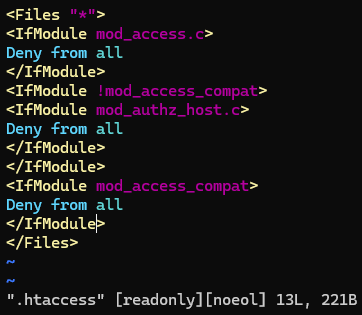
The ./backwpup-restore/extract/ folder has an .htaccess file:
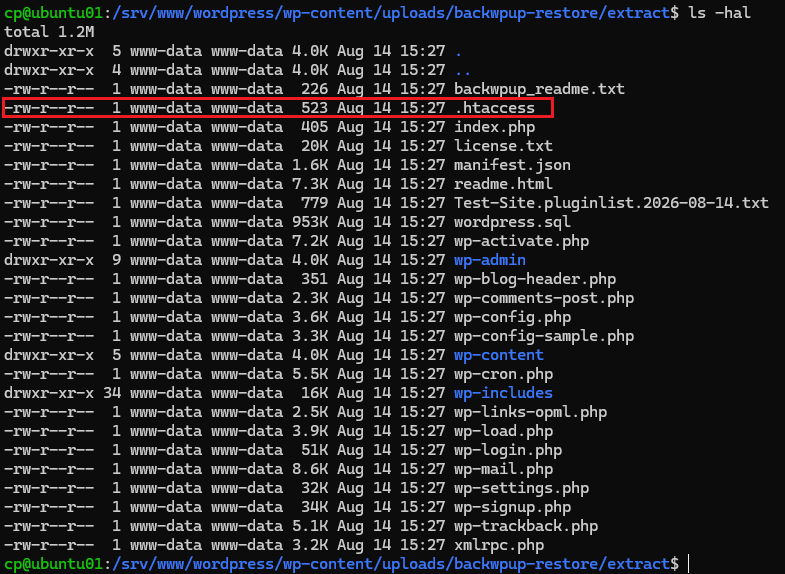
The file has a deny rule blocking access to all files in that folder and in any child folders.
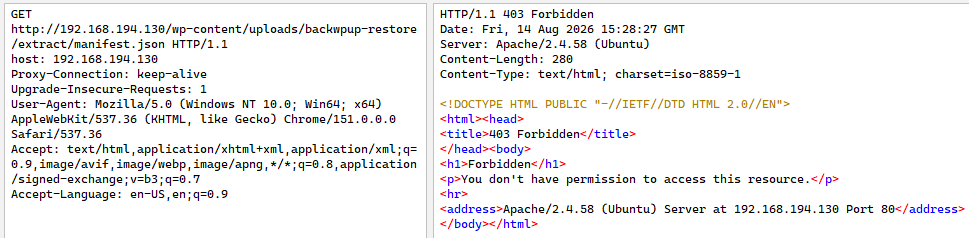
On an Apache server this prevents remote download of any files from an extracted backup, including manifest.json. Attempts to download manifest.json generate a 403 Forbidden error:
But on non-Apache servers, the manifest file can be successfully downloaded:
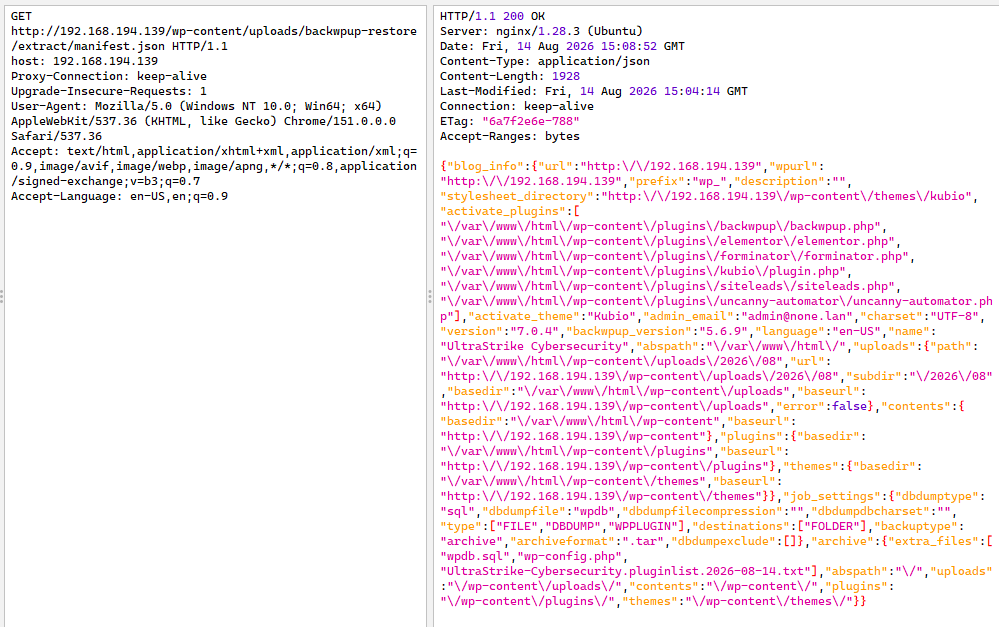
An attacker can parse the manifest for the file name of the .sql database backup and use the file name to download it from http://<site>/wp-content/uploads/backwpup-restore/extract/<SQL file name>.
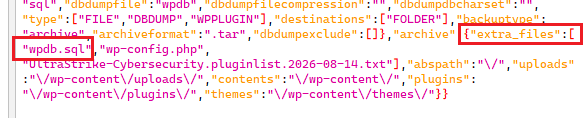
The vulnerability impact is unauthenticated access to a copy of the site database.
BackWPup did not delete extracted backup files after a restore completed. The manifest.json file could be downloaded by an attacker months after a backup was last restored.
A site has to have restored at least one BackWPup backup to be vulnerable. If a site has never restored a backup, there is no manifest.json or database backup in wp-content/uploads/backwpup-restore/extract/ for an attacker to download.
BackWPUp fixed the vulnerability in version 5.7.4 by no longer extracting the manifest.json file during restore operations. The file no longer exists, cannot be downloaded, and an attacker can thus no longer obtain the name of the database backup file to download it.
Kudos to the BackWPUp team for being responsive and addressing the issue in a timely manner!
Exposure
How often does this issue pop up? Does anyone actually use non-Apache servers to host their WordPress sites?
To help shed light on the exposure question, the research team investigated several quick-deploy WordPress solutions offered by several popular hosting providers to see what server software users get when standing up a WordPress site in those environments. Note that organization’s self hosting their sites can choose whatever server software they prefer, so this research just focused on cloud and managed hosting scenarios.
First, a few disclaimers:
- Hosting WordPress on a non-Apache web server is not in and of itself a vulnerability. The providers listed here should not be thought of as “vulnerable”. The use of a non-Apache web server opens up the possibility of exploitable vulnerabilities in WordPress plugins but the plugins are the vulnerability source, not the web server software or the hosting provider.
- The research team did not exhaustively review all providers. The cloud and web hosting market is crowded and many hosting solutions were not included.
- Some providers had multiple WordPress deployment options. Where possible I list the one used, but it’s possible a given provider has alternate deployment options that use different web servers.
- The research team did not perform unauthorized security testing against any provider. I spun up a test WordPress site, installed a few plugins, and checked to see what web server backend was in use. That was all.
Now on to the results.
The following table summarizes the reviewed providers and the server software the team observed in use.
| Provider | WordPress Server |
| DigitalOcean | Caddy |
| Azure AppService | Nginx |
| AWS (LightSail) | Apache |
| Akamai (Linode) | User selects Apache or Nginx |
| WordPress.com | Nginx |
| DreamHost | Apache |
| LiquidWeb | Apache |
| BlueHost | Apache |
Two major cloud providers and one major WordPress specific hosting provider use web servers not named “Apache” for their quick-deploy WordPress solutions.
Provider specific notes are included below.
DigitalOcean
The WordPress image available on the DigitalOcean marketplace uses the Caddy webserver. https://marketplace.digitalocean.com/apps/wordpress

Caddy does not support .htaccess files and happily serves files from directories where .htaccess files are attempting to deny access.
Azure AppService
The Azure AppService deployment uses Nginx. https://learn.microsoft.com/en-us/azure/app-service/quickstart-wordpress#create-wordpress-site-using-the-azure-portal
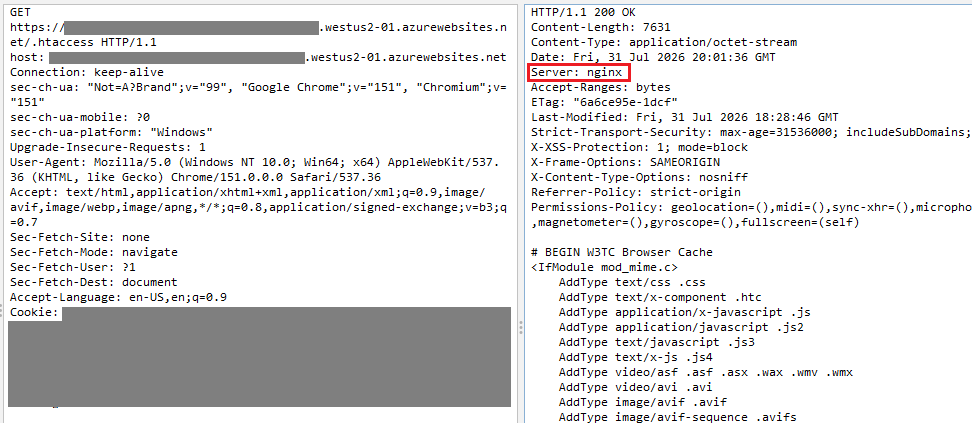
Nginx does not support .htaccess and serves content from directories where .htaccess files are attempting to deny access.
AWS LightSail
AWS LightSail has a prebaked WordPress solution that deploys an EC2 instance with WordPress installed and configured. https://docs.aws.amazon.com/lightsail/latest/userguide/amazon-lightsail-launch-and-configure-wordpress.html
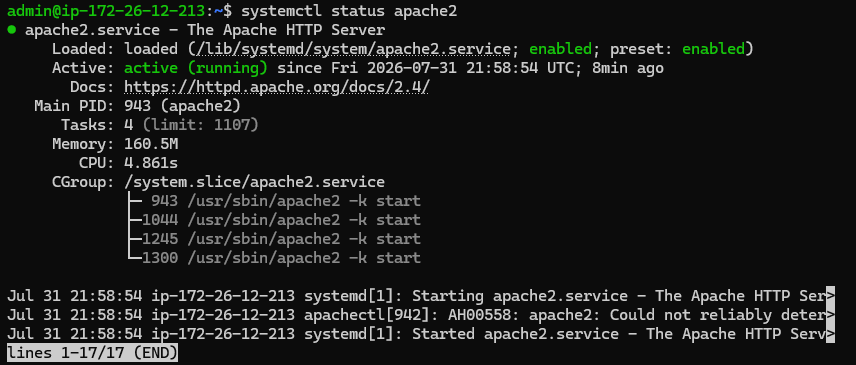
LightSail deployed WordPress with Apache webserver. Plugin-created .htaccess files were incorporated into access decisions.
Akamai (Linode)
Akamai’s hosting service, Linode, allows users to specify Nginx or Apache when creating the one-click WordPress deployment. https://www.akamai.com/cloud/marketplace-docs/guides/wordpress#wordpress-options
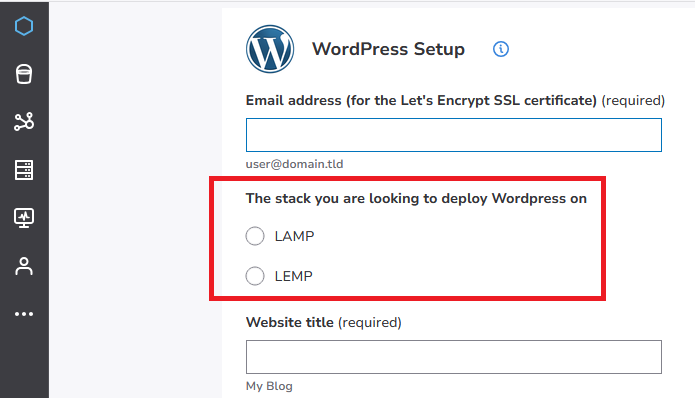
Whether an Akamai quick-deploy WordPress site supports .htaccess files is dependent on the user’s choice of server during the provisioning process.
WordPress.com
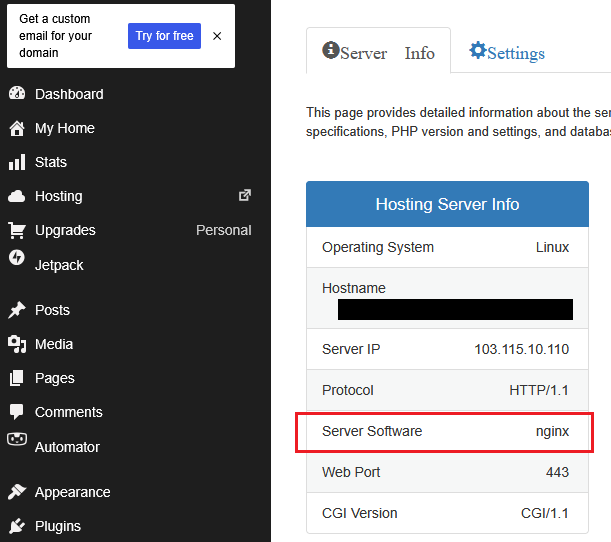
WordPress.com is a major hosting provider for WordPress sites. The provider uses Nginx as the backend server and .htaccess files created by plugins are ignored.
DreamHost
DreamHost’s WordPress hosting service (https://www.dreamhost.com/wordpress/) runs WordPress sites on Apache.
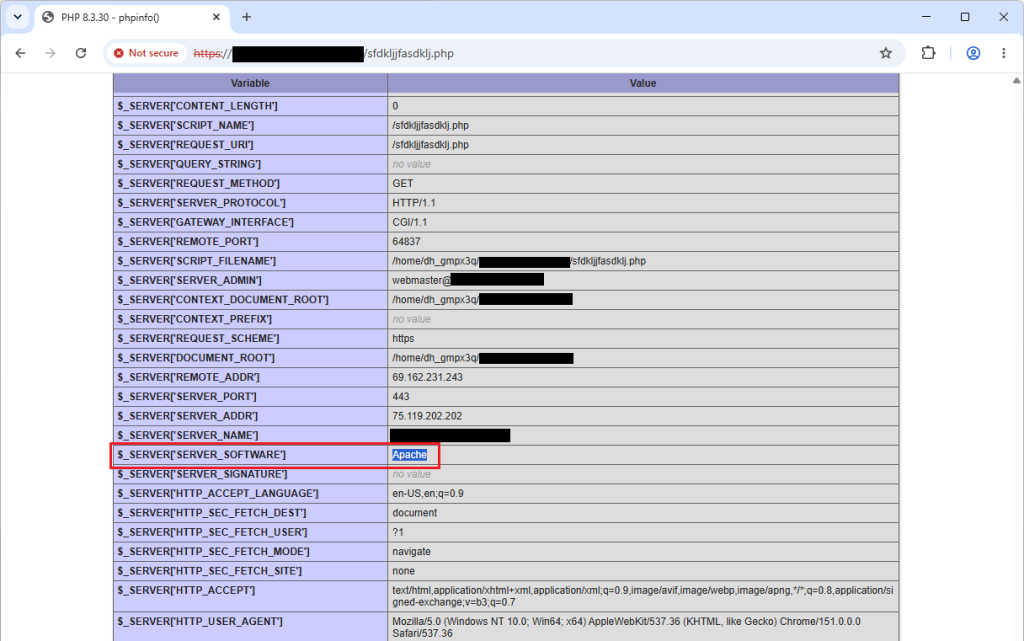
LiquidWeb
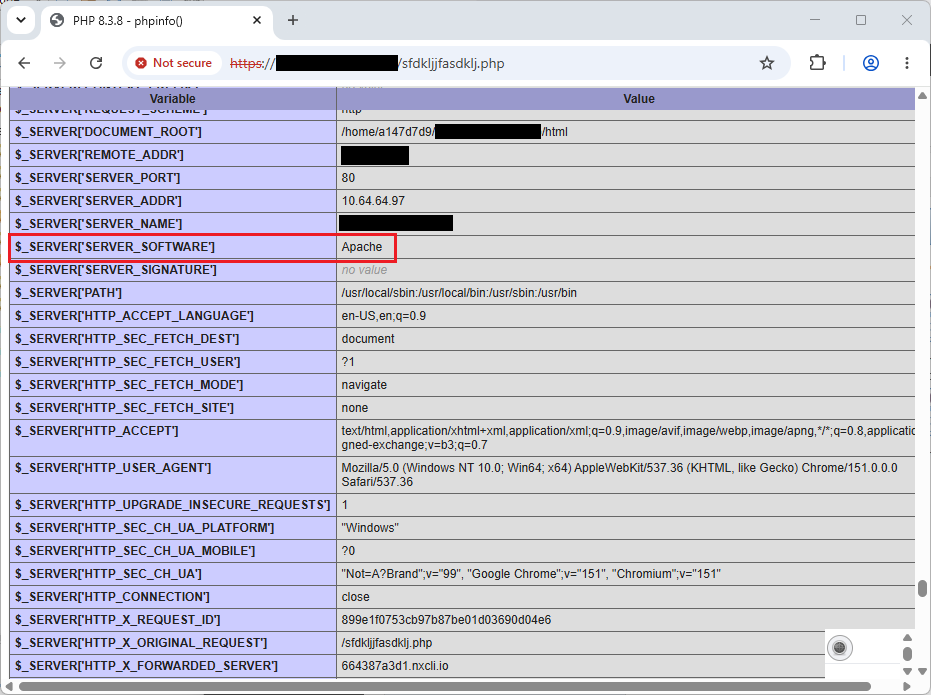
LiquidWeb hosts WordPress sites on Apache, although it’s not immediately obvious. Inspecting the response’s “Server” header shows a value of “nginx”:
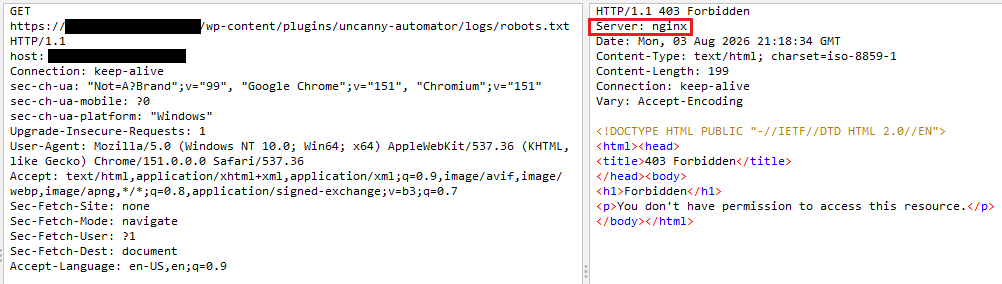
At a cursory glance it seems the site is hosted on Nginx but it’s actually not. Checking the server details directly from PHP shows it’s running Apache:
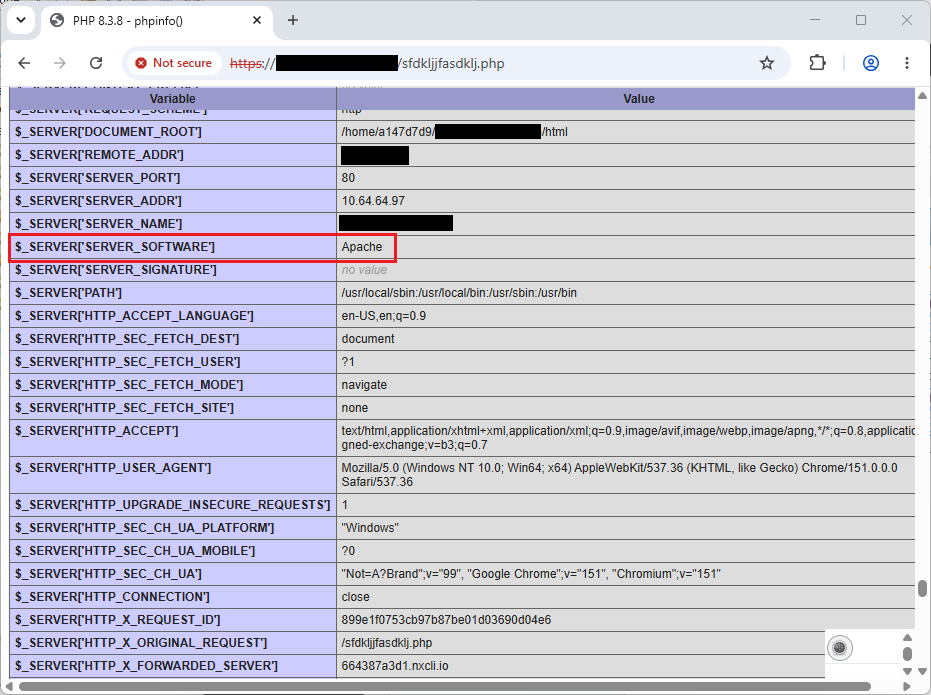
One possible explanation for this discrepancy? The “Server: nginx” header comes from a reverse proxy. LiquidWeb likely receives incoming connections on Nginx servers and forwards the request to an internal Apache server which is actually running your site. Nginx is a popular reverse proxy server in addition to being a web server, so such deployments are not uncommon.
Since .htaccess files are processed (or not) by the server on which the site is directly running, .htaccess files do appear supported on LiquidWeb WordPress sites.
BlueHost
BlueHost’s WordPress hosting option (https://www.bluehost.com/wordpress-hosting) is similar to LiquidWeb, with traffic fronted by Nginx proxy servers…
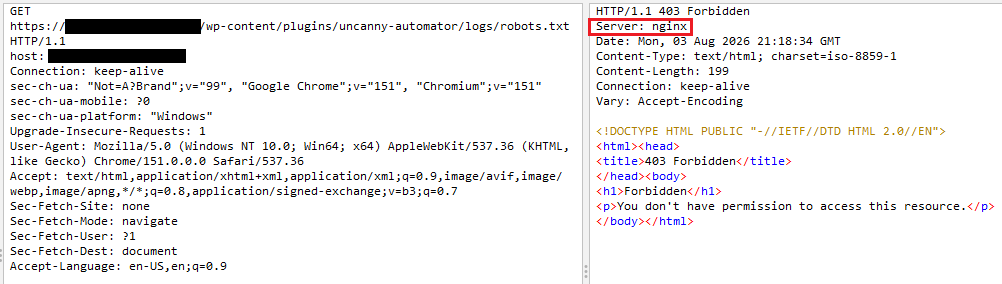
…but WordPress sites hosted on backend Apache servers.
Shodan
Out of curiosity, the research team reviewed Shodan data and found many WordPress sites return a non-Apache value in the “Server” response header. Filtering to Nginx returned just over 29k results as of test time.
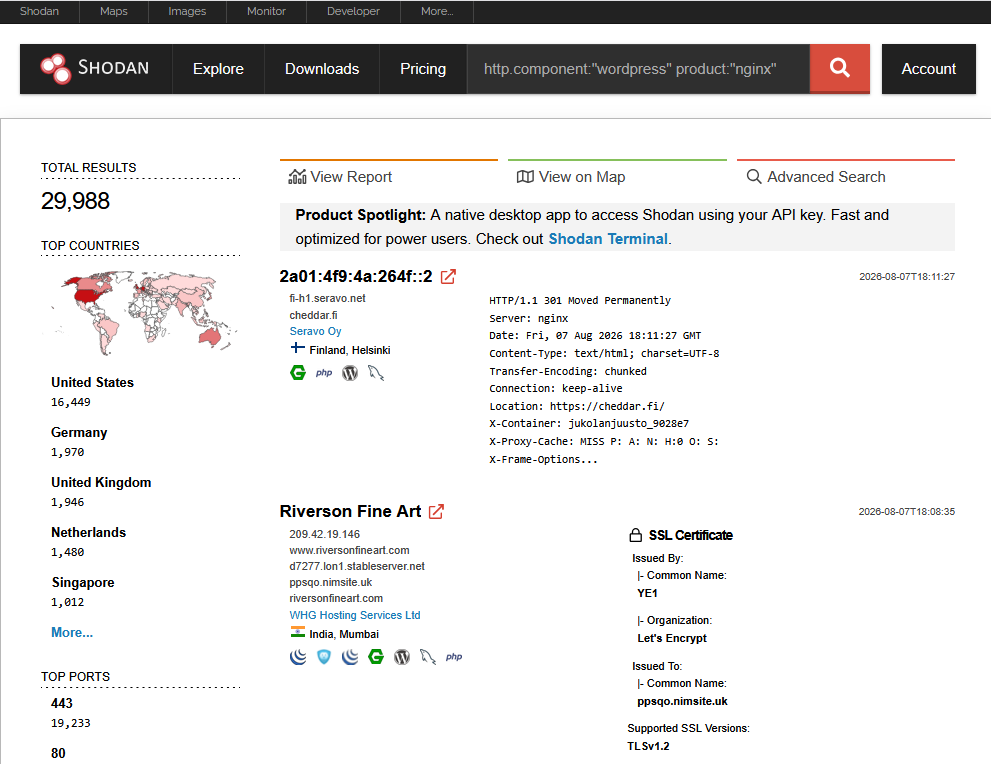
Recall how BlueHost and LiquidWeb both returned Nginx values in the Server header despite the backend site running directly on Apache? Our guess is that many of these WordPress sites found by Shodan are also using Nginx as a reverse proxy and a different server for backend hosting.
The presence of a particular server software string in the “Server” header is not by itself an automatic indicator of what server is actually running the site, but it can be a good starting point for further investigation.
Response
How do you know if a plugin on your (non-Apache) site is vulnerable?
Server Administrators
For sites deployed with other server software, if you have access to your server’s webroot, you can recursively search for .htaccess files and look for any sensitive files generated by the plugin in the same or child folders. If sensitive files are in those folders, and the filenames are predictable, then the plugin might be vulnerable.
For example, if your WordPress site’s webroot is /var/www/html/, you can use the following Bash one-liner to find .htaccess files:
find /var/www/html/ -type f | grep \\.htaccessThen check the folder tree where any .htaccess files are found and look for sensitive files.
Security Analysts
If you don’t have access to your server’s webroot (or can’t get your server administrator to run the above steps for you), then start by using external tools such as WPScan (https://github.com/wpscanteam/wpscan) to fingerprint plugins installed on your organization’s WordPress sites.
Then setup a test WordPress site in a virtual machine, install the same plugins, and check the webroot to see if any sensitive files get created in folders with .htaccess files. This process is comprehensive but also time-consuming – access to the webroot to check directly is best if at all possible.
Conclusion
Integrating security into software development requires understanding the environments where the software could run. For software that extends other software, such as plugins, use the parent framework to guide development.
WordPress plugin developers can integrate security by testing their plugins in different WordPress environments. Plugin developers are responsible for writing a plugin with security resiliency for any web server and to not assume the use of Apache. Randomizing file names instead of using .htaccess is a better solution which reduces the risk of unauthorized access while being compatible with any web server software.
Ultrastrike helps organizations find existing security gaps so they can address the risks they actually have without losing resources addressing risks they don’t. Want to know if you have vulnerable plugins in your WordPress sites, or other cyber risks lurking in your environments? Contact us today to learn how we can help!
Comments are closed